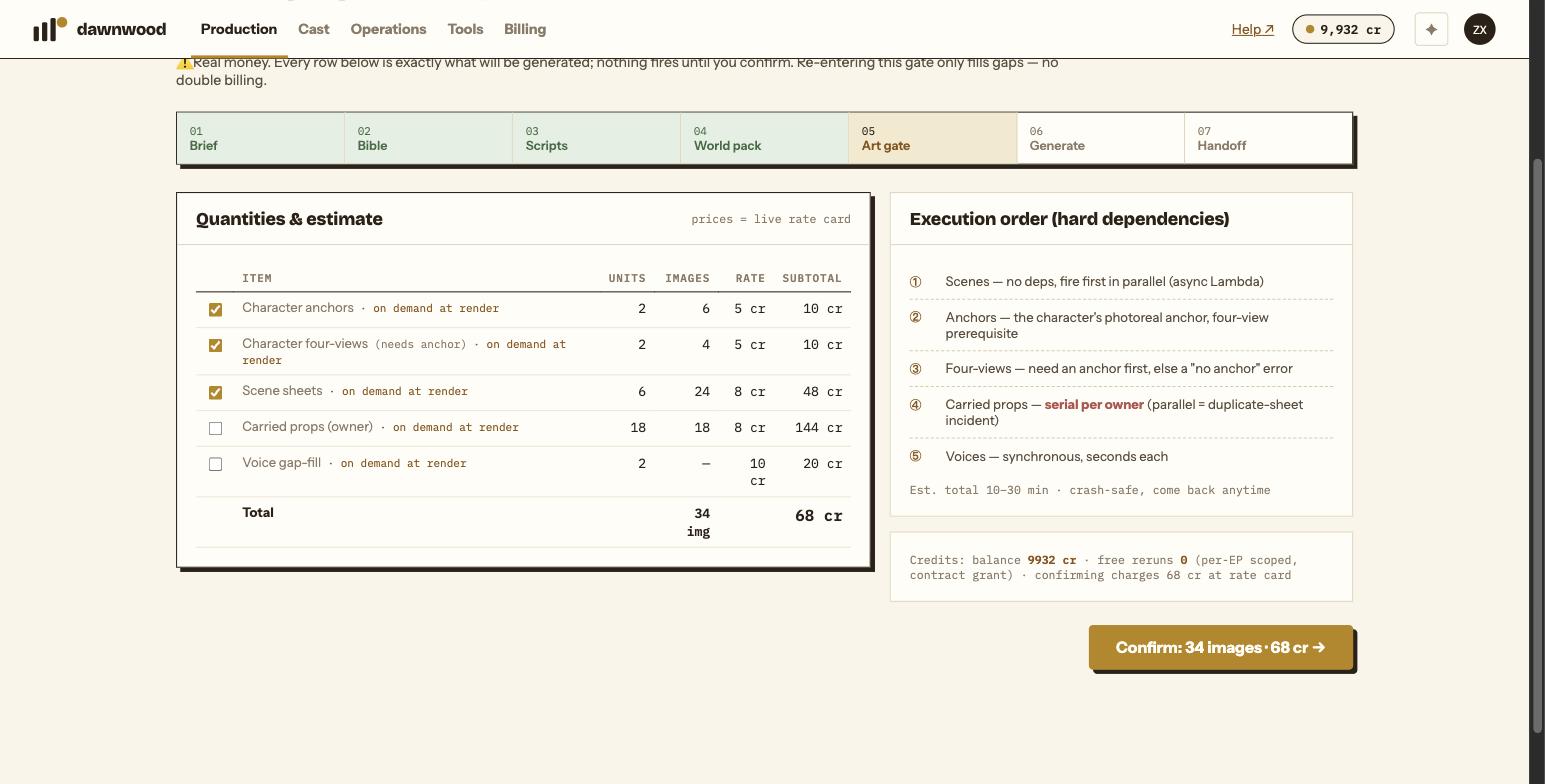
Short answerEach row is one kind of image about to be generated, with the count and the credit rate. Character anchors and four-views for the cast of episode one are what you need first; scenes, props and characters who appear later are deferred and can be left unticked because the pipeline fills them in at render time at the same rates.
Reading the table
The Quantities & estimate panel lists exactly what will be generated; nothing fires until you click Confirm. Columns are a tick box, the item, how many units, how many images, the rate per image and the subtotal. The total row shows the number of images and the credits.
| Row | What it is | Rate |
|---|---|---|
| Character anchors | The reference portraits of a character: a full-body front, a full-body back and a headshot. Only missing ones are counted. | 5 cr per image |
| Character four-views | The turnaround sheet used to keep the character consistent from every angle. Needs the anchor first. | 5 cr per image |
| Scene sheets | Four views of a location, day and night as described on the scene card. | 8 cr per image |
| Carried props | One image per owned prop so it looks the same in every shot. | 8 cr per image |
| Voice gap-fill | A newly designed voice for a character who has none. The library is tried first, free; a new voice is only billed if nothing fits. | 10 cr per voice |
Rows marked "on demand at render"
For a self-serve run, anything episode one does not need is split into its own row, unticked, tagged on demand at render. That covers all scenes and props, plus anchors, four-views and voices for characters who do not appear in episode one. The pipeline generates them per episode when they are first needed, at the same rates. Tick the row only if you want them now, for example to review every location before rendering anything.
Dependencies and order
Scenes have no dependencies and start first, in parallel. Anchors come next, then four-views, which fail with a "no anchor" error if the anchor has not finished. Carried props are generated one at a time per owner, because generating them in parallel once produced duplicate sheets. Voices take seconds each. Expect ten to thirty minutes for a full pack; the page is safe to close.
What the button says
Confirm: 24 images + 3 voices · 150 cr → is the exact charge. If your balance is short you get an insufficient credits message and nothing is charged. Voices are not pre-charged: a library voice costs nothing, and only a genuinely new design bills.
The balance line
The credits panel above the button shows your permanent balance. Signup credits sit in a separate expiring pool, so a new account can read balance 0 cr here and still confirm successfully; the top-bar capsule shows the full available amount.
Still stuck? Email support@dawnwood.ai with your account email, the series, the episode and the segment or group — see what to include.