Short answerName the place the way the page does, SEG 2 · G3, and the shot number if you know it, then say what is wrong in plain words and what it should be instead. From the Review page, pause on the frame and use Ask agent to fix; it fills the location in for you.
Use the page's names
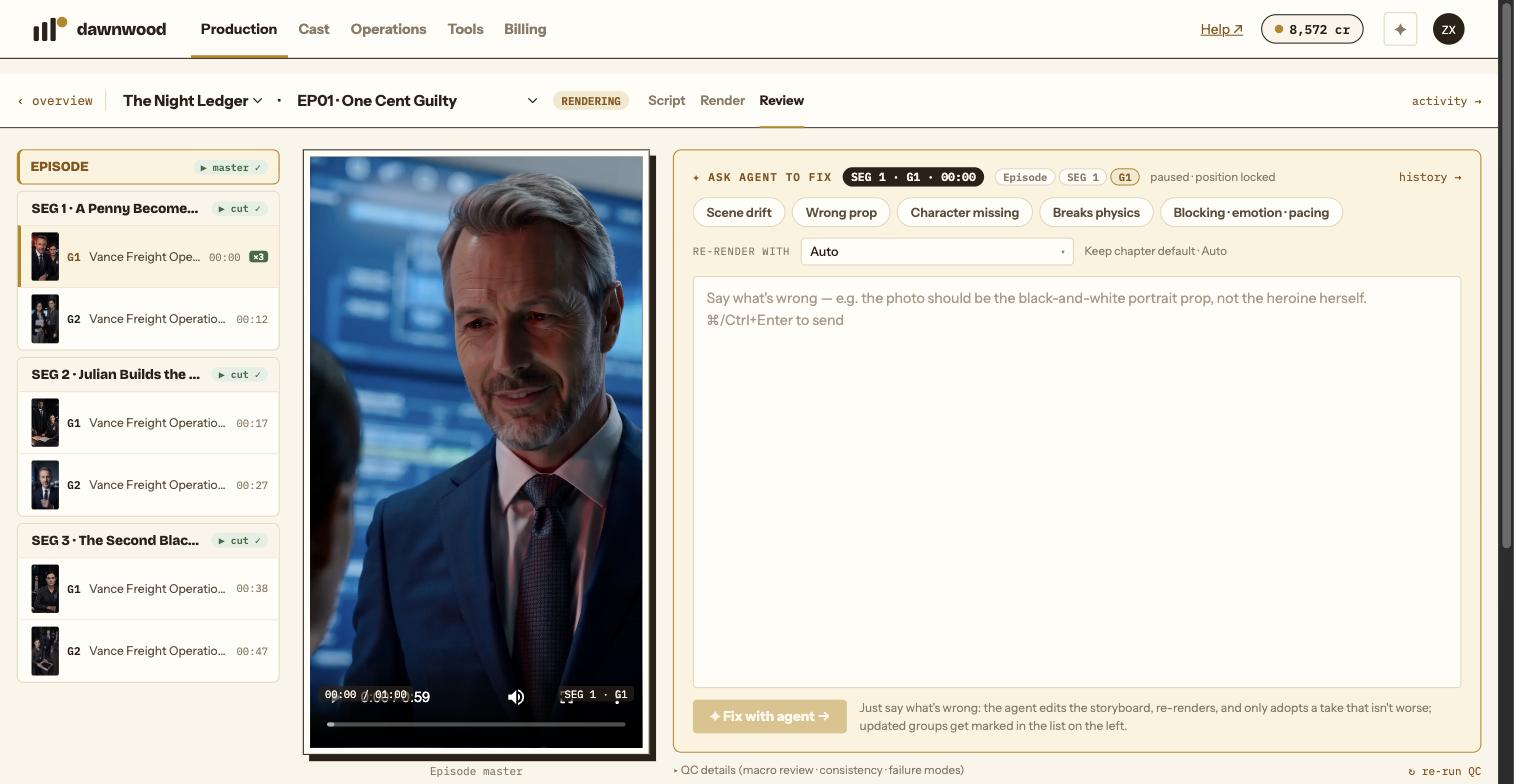
Segments are SEG 1, SEG 2 in order; groups are G1, G2 within a segment; shots are numbered inside a group. These are the labels in the film tree, on the group cards and in the render log, and the agent uses exactly the same numbering. "The last group of SEG 2" and "shot 2 of G3" are unambiguous. "The scene with the rooster" is not, and it will ask.
Let the Review page do it
Play the episode, pause where the problem is. The scope pill under Ask agent to fix follows the playhead and reads, for example, SEG 2 · G3 · 01:12; you can pin it or switch scope to the segment or the whole episode. Pick a chip if one fits (Scene drift, Wrong prop, Character missing, Breaks physics, Blocking · emotion · pacing), type the note, click Fix with agent →. The message arrives formatted as EP01 SEG2 · G3 @01:12 · [Wrong prop] · your note.
The ↻ Regenerate box on a shot row does the same for one shot.
Say what is wrong and what it should be
Good: "The photo she holds should be the black-and-white portrait prop, not the heroine herself." Good: "Wu is looking at the camera; he should be looking down at Cheng in the ring." Less useful: "This looks bad." The agent has to guess which of five things you mean, and a guess costs a render.
If the fix should match a specific image, attach it: paste, drag or use the paperclip. Attach how it should look, not another screenshot of the problem. Adult likenesses require written consent; never minors.
Choose the engine if it matters
Re-render with next to the box names an engine for this fix; leave it on Keep chapter default otherwise. The agent honours the choice exactly.
One shot vs. several
A fix that touches one shot in the episode on screen starts right away. A fix that touches several shots, a shot in another episode, or that uses another episode as a reference, first comes back as a fix plan card listing the targets, the reference and the change, with Confirm plan and Revise. Nothing is touched until you confirm; a reference is read, never edited.
What comes back
The chat shows a watch line while it renders. When the take lands you get the result and, if QC passed, ✓ QC passed · merged into group with Roll back to previous take; if QC could not decide, Rebuild group with this take lets you adopt it yourself. Changed groups are marked in the film tree.
Still stuck? Email support@dawnwood.ai with your account email, the series, the episode and the segment or group — see what to include.