Short answerEvery post's caption carries its own short link, which counts taps and passes a click id (dw_click) to your landing page. Send that id back when someone buys, with the website pixel, Stripe or a server postback, and the purchase is credited to the exact account and post, first touch within a 7-day window by default. Results then switch from taps to revenue per 1,000 views.
How a sale is traced back
- Each niche has one landing link, and each account gets a tracked version of it (see niches and posting rules).
- When a post is scheduled it gets its own short link, which is what
{link}puts in the caption. A tap on it is counted, then forwards to your landing page withutm_*,dw_account,dw_postand adw_clickclick id added. - Your site keeps the
dw_clickvalue and reports it back when the visitor signs up or buys. - Dawnwood credits that event to the account and post the click came from. Credit goes to the first touch: the first tracked click within the attribution window (7 days by default; 1 to 30).
Without step 3 you still get taps per account and per post, and results judge accounts on taps. Once purchases come in, results judge them on revenue; see reading publishing results.
Connect your checkout
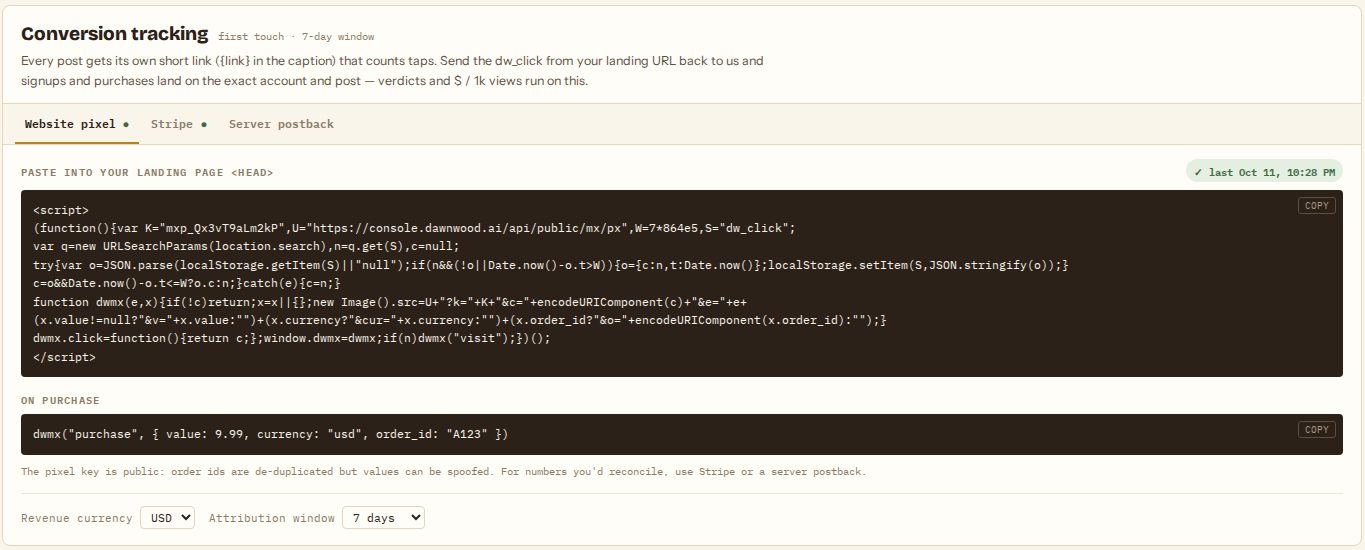
Open Operations › Publish › Niches and scroll to Conversion tracking. Use one of three methods; you can combine them.
Website pixel
Paste the snippet into your landing page's <head>. It records a visit when someone arrives from a tracked link, remembers their dw_click for the attribution window, and gives you a function to call on purchase:
dwmx("purchase", { value: 9.99, currency: "usd", order_id: "A123" })The pixel key is public, so this is the quickest setup but not tamper-proof: order ids are de-duplicated, but a visitor could send a fake value. For revenue you reconcile against, use Stripe or a postback.
Stripe
- In Stripe, add a webhook endpoint with the URL shown in the card, listening to
checkout.session.completedandpayment_intent.succeeded. - Paste that endpoint's signing secret (
whsec_…) and click Save. - When you create a Checkout Session, pass the visitor's click id as
client_reference_id(on a page with the pixel,dwmx.click()returns it), or asmetadata.dw_click.
The card shows when the last event arrived.
Server postback
Click Create key for a server key. It is shown once; copy it then. From your server, send:
POST https://console.dawnwood.ai/api/public/mx/convert
Authorization: Bearer <server key>
{"click_id": "<dw_click>", "event": "purchase", "value": 9.99, "currency": "usd", "order_id": "A123"}
event can be visit, signup or purchase. Sending the same order_id again counts once, so retries are safe. A click outside the attribution window returns attributed: false; don't retry those. Rotate issues a new key and the old one stops working immediately.
Currency and window
Set Revenue currency to the currency your results should show, and Attribution window to how long after a click a purchase still counts (1 to 30 days). Both apply from the next event on.
Still stuck? Email support@dawnwood.ai with your account email, the series, the episode and the segment or group — see what to include.