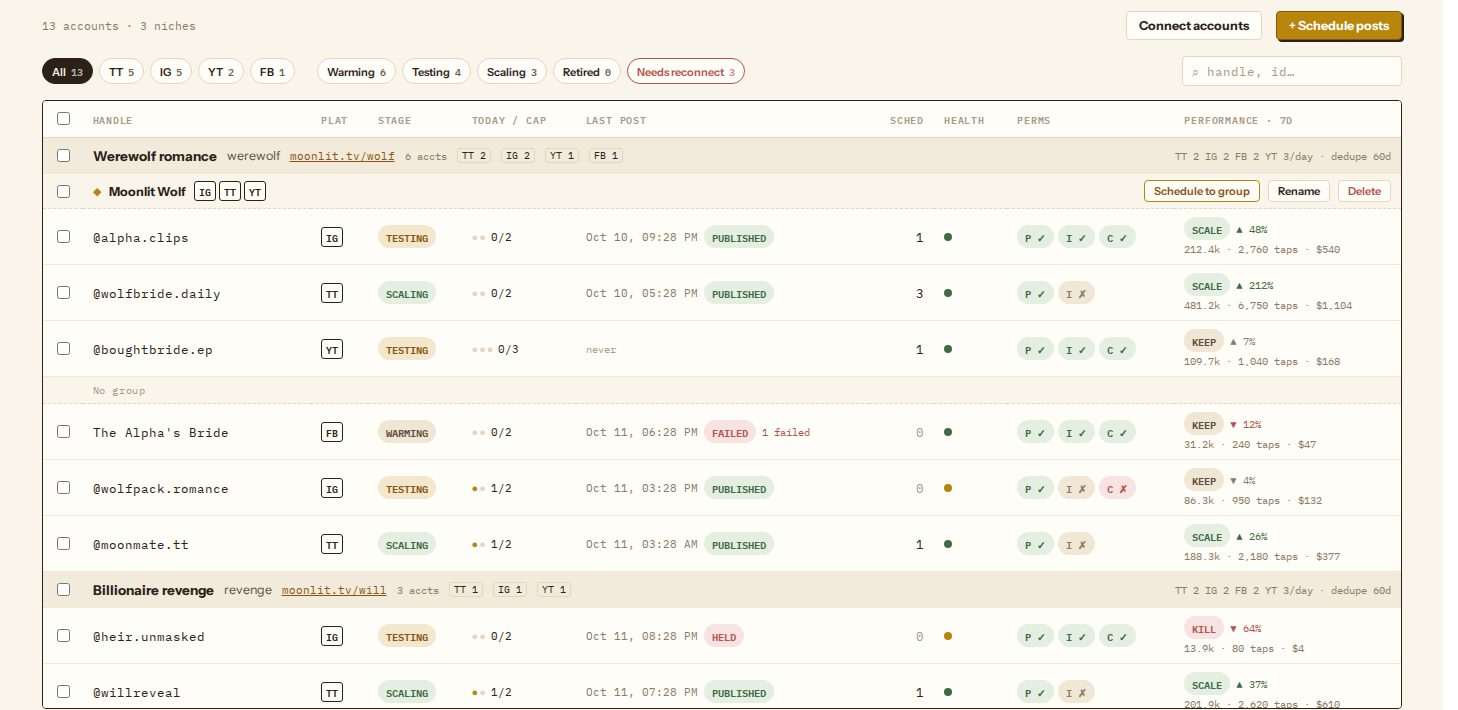
Short answerConnect each account under avatar menu → Connected accounts, as many per platform as you run. Operations › Publish › Accounts then lists them by niche with their stage, posts in the last 24 hours against the daily cap, health and permissions. Pause an account to hold its posts, retire it to stop it for good, and reconnect when the Inbox says a token is expiring or a permission is missing.
Connect accounts
Accounts are connected in one place for all of Dawnwood: the avatar menu (top right) → Connected accounts, or Connect accounts at the top of the Accounts page. Pick a platform, sign in on the platform's own page and keep every permission box ticked. Repeat for each account; there is no limit per platform.
| Platform | What you connect | Posts as |
|---|---|---|
| TikTok | A TikTok account | Videos |
| A professional (business or creator) account | Reels | |
| YouTube | A channel | Shorts |
| A Facebook Page you manage | Reels on the Page |
Dawnwood never sees your password, and posts go out through each platform's official API from your own account. To remove an account, use Disconnect in Connected accounts.
The Accounts page
Every connected account appears in Operations › Publish › Accounts, grouped by niche, with unassigned accounts at the bottom. Filters at the top narrow by platform, stage or Needs reconnect. The columns:
- Stage: warming, testing, scaling or retired. Stages are your own labels for where an account is in its life; click the badge to change it. Retired accounts never post and are left out of results.
- Today / cap: posts in the last 24 hours against the account's daily cap, which comes from its niche (see niches and posting rules).
- Last post and Sched: when it last posted and how many posts are waiting.
- Health: green when it can post, amber when something needs attention.
- Perms: three capsules. P publish, I insights (reading views), C comments (posting a first comment and reading replies). A ✗ means that permission is missing; reconnecting with every box ticked fixes it. TikTok has no comment API, so its C capsule is absent.
- Performance · 7d: views, link taps and revenue for the last seven days with the account's verdict; see reading publishing results.
Tick several accounts to Assign niche… (move them into a niche), Set stage…, or start a Schedule… for just those accounts.
One account in detail
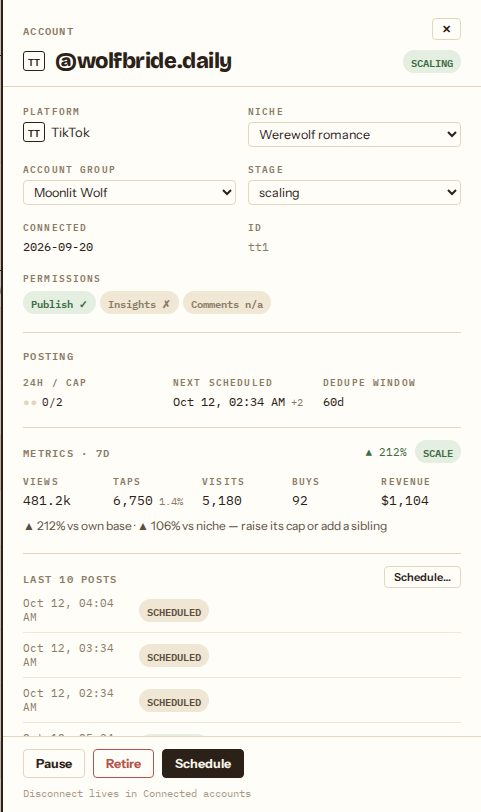
Click a handle to open its drawer. From here you can move it to another niche or account group, change the stage, see the next scheduled post and the duplicate-footage window, and read its last ten posts. The buttons at the bottom:
- Pause: the account keeps its schedule, but posts that come due while it is paused are held instead of sent. They show up in the Inbox as held; Resume and reschedule them.
- Retire: the account stops posting for good and drops out of results. Use it for accounts you've abandoned or that the platform restricted.
- Schedule: opens the scheduler with this account preselected.
Account groups
An account group is one brand or persona across platforms, for example the TikTok, Instagram and YouTube accounts of the same character. Create one from a selection with Group ▾ → New group from selection…. In the scheduler, a fully selected group can post the same clip at the same time on every member, which is how a brand usually wants to appear. Groups sit inside a niche and don't change caps or duplicate rules.
Tokens and permissions
Instagram connections expire roughly every 60 days. A week before, the Inbox shows "@account loses publishing in N days"; click Reconnect and sign in again. If a token lapses, scheduled posts on that account fail until you reconnect.
Accounts connected before a permission existed (for example comments) show a ✗ on that capsule and a Permission item in the Inbox. One reconnect grants it; nothing else changes. See fixing publishing problems.
Still stuck? Email support@dawnwood.ai with your account email, the series, the episode and the segment or group — see what to include.