Short answerOperations › Publish › Inbox lists everything that needs you, most urgent first. Token and Consent items mean an account must be reconnected; Failed means the platform rejected the post, so read its reason and use Reschedule; Held means the account was paused when the post came due; Permission means first comments can't post or be read until you reconnect once. Fix the cause, then reschedule from the Inbox or the Queue.
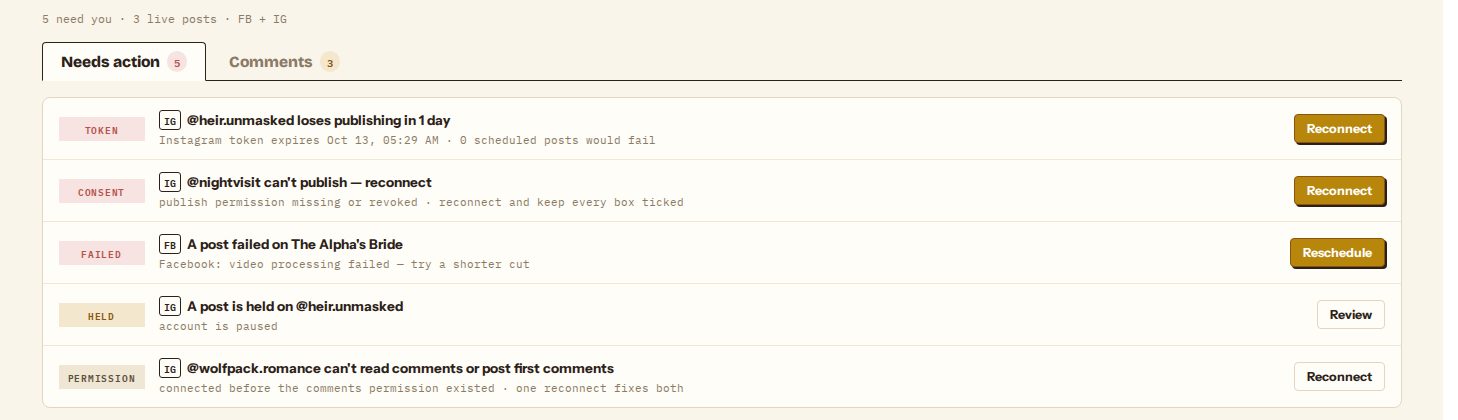
Where problems show up
Three places show the same list, most urgent first:
- Operations › Publish › Inbox → Needs action, the full list.
- Action inbox on Operations › Results › Overview, the top items.
- Held & failed beside the Queue calendar, for posts only.
What each item means
| Tag | What happened | What to do |
|---|---|---|
| Token | An Instagram connection expires within a week. After it expires, that account's scheduled posts fail. | Reconnect and sign in again. Scheduled posts keep their times. |
| Consent | The account has no permission to publish: you unticked a box when connecting, or revoked the app on the platform. | Reconnect and keep every permission box ticked. |
| Failed | The platform rejected the post. The row shows the platform's reason, for example "video processing failed — try a shorter cut". | Fix the cause, then Reschedule. The scheduler opens with that video and account. |
| Held | The post came due while its account was paused or retired, or while publishing was paused on your workspace. Held posts are not sent later on their own. | Review opens the Queue. Resume the account, then Reschedule, or Cancel the post. |
| Permission | The account was connected before the comments permission existed, so first comments are skipped and replies can't be read. Posting still works. | Reconnect once; that grants both. |
| 1st comment | The post went live but its first comment didn't post. | Open post and add the comment by hand if it matters. The post itself is fine. |
Reconnect opens Connected accounts; choose the same account so its history, niche and schedule stay attached.
Problems caught before scheduling
Some problems never reach the queue because the scheduler blocks them while planning:
- "cap N/24h reached on this account": the account would post more than its niche's daily cap. Pick Next open slot, or raise the cap in the niche's policy.
- "same video already on @account — pick another cut": the duplicate-footage rule. Choose another video, or let the scheduler swap one in.
- "already posted or scheduled on this account": a video never posts twice on one account.
- "account is paused" / "account is retired" / "reconnect this account to publish": fix the account first.
- "needs TikTok consent": answer TikTok's questions in step 4.
- "Workspace daily cap reached": a workspace posts at most 300 times a day across all accounts.
See scheduling posts for the states the plan shows.
Posting but no views
If an account keeps posting and every post sits at 0 views, results mark it Check: the platform may be limiting its reach. Pause it for a day, then post again and watch the first hour. On Instagram, a new Reel often shows no views for its first 30 minutes even when nothing is wrong. See reading publishing results.
Still stuck
Send the account handle, the post's time and the reason shown in the Inbox to support; see contacting support.
Still stuck? Email support@dawnwood.ai with your account email, the series, the episode and the segment or group — see what to include.