Short answerPublishing posts short videos to many TikTok, Instagram, YouTube and Facebook accounts on a schedule, through each platform's official API, and shows which account and post brought visits and sales. It is in private beta; once your workspace is enabled, a four-step setup in Operations walks you through connecting accounts, creating a niche, adding videos and scheduling your first week.
What Publishing does
Publishing is the part of Operations that runs many social accounts at once. You connect the accounts you already own, group them by niche, put short videos in a library, and schedule them. Every post goes out from your own account through the platform's official API at the time you planned; nothing is posted through a phone farm or a shared login.
It covers three stages of the Operations menu:
| Stage | Pages | What you do there |
|---|---|---|
| Content | Library | Upload clips or import finished episodes, write the hook for each |
| Publish | Queue, Accounts, Niches, Inbox | Connect and organise accounts, schedule, fix what breaks |
| Results | Overview | See what went out, what is working, and which accounts to scale or pause |
You don't need to make your videos in Dawnwood. Clips cut elsewhere work the same as episodes of a series made here, and Operations › Content › Clips can cut them for you from any long video.
Getting access
Publishing is in private beta. Until your workspace is enabled, Operations shows a Publishing · private beta card with Request access. Click it once; the card changes to "Requested — Publishing appears here once enabled". Episode publishing from Production › Episodes, Clips and Languages work without it.
The four setup steps
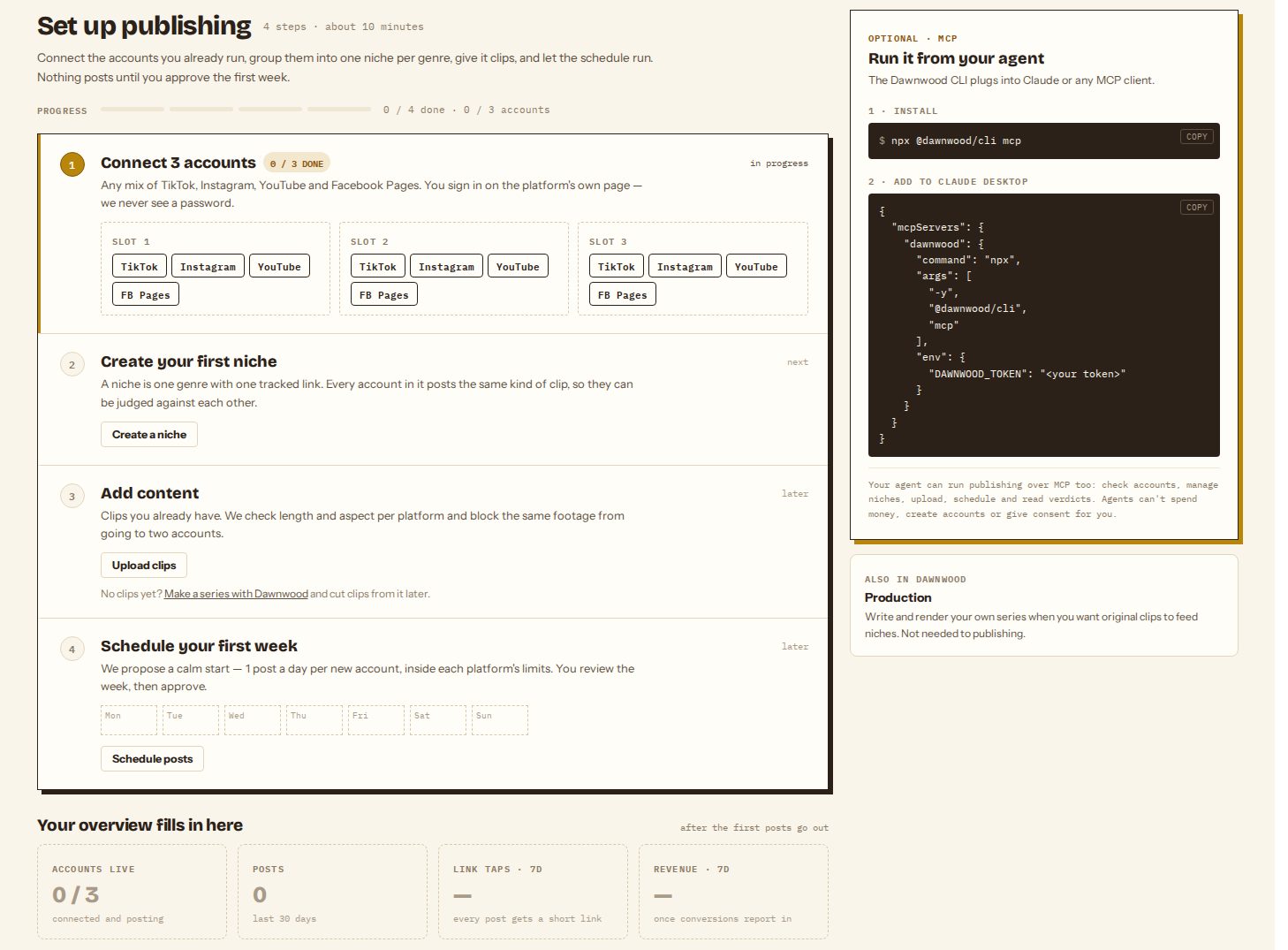
Once enabled, Operations › Results › Overview shows a checklist until your first posts go out. It takes about ten minutes.
- Connect 3 accounts. Any mix of TikTok, Instagram, YouTube and Facebook Pages. You sign in on the platform's own page; Dawnwood never sees a password. See connecting many accounts.
- Create your first niche. A niche is one genre with one tracked link. Every account in it posts the same kind of clip, so they can be judged against each other. See niches and posting rules.
- Add content. Upload clips you already have, or import finished episodes from your series. Dawnwood checks the format and blocks the same footage from going to two accounts on the same platform.
- Schedule your first week. The scheduler proposes a calm start, one post a day per new account inside each platform's limits. You review the week, then approve it. Nothing posts until you confirm. See scheduling posts.
The overview fills in after the first posts go out: accounts live, posts, link taps and, once you connect a checkout, revenue.
Running it from an agent
The checklist's side panel shows how to connect the Dawnwood CLI to Claude or any MCP client. An agent can list accounts and niches, add videos, plan and schedule posts, and read the report with the matrix_* tools; see what your agent can do over MCP. Agents can't spend money, create platform accounts or give the platform consents for you.
What it costs
During the beta, posting does not use credits. Making the videos (Clips, renders, language versions) is billed as usual; see what costs credits.
Still stuck? Email support@dawnwood.ai with your account email, the series, the episode and the segment or group — see what to include.