Short answerYou start with 500 credits for 30 days. Renders cost 5 to 10 credits per second depending on the engine; art, voices and fixes have their own prices shown before you confirm.
What do 500 credits cover?
Your 500 signup credits expire 30 days after activation. A modest project can reach its bible, scripts, first-episode character assets and one rendered segment. This is an estimate, not a promise of a whole free episode: more characters, assets, duration or retakes use more credits.
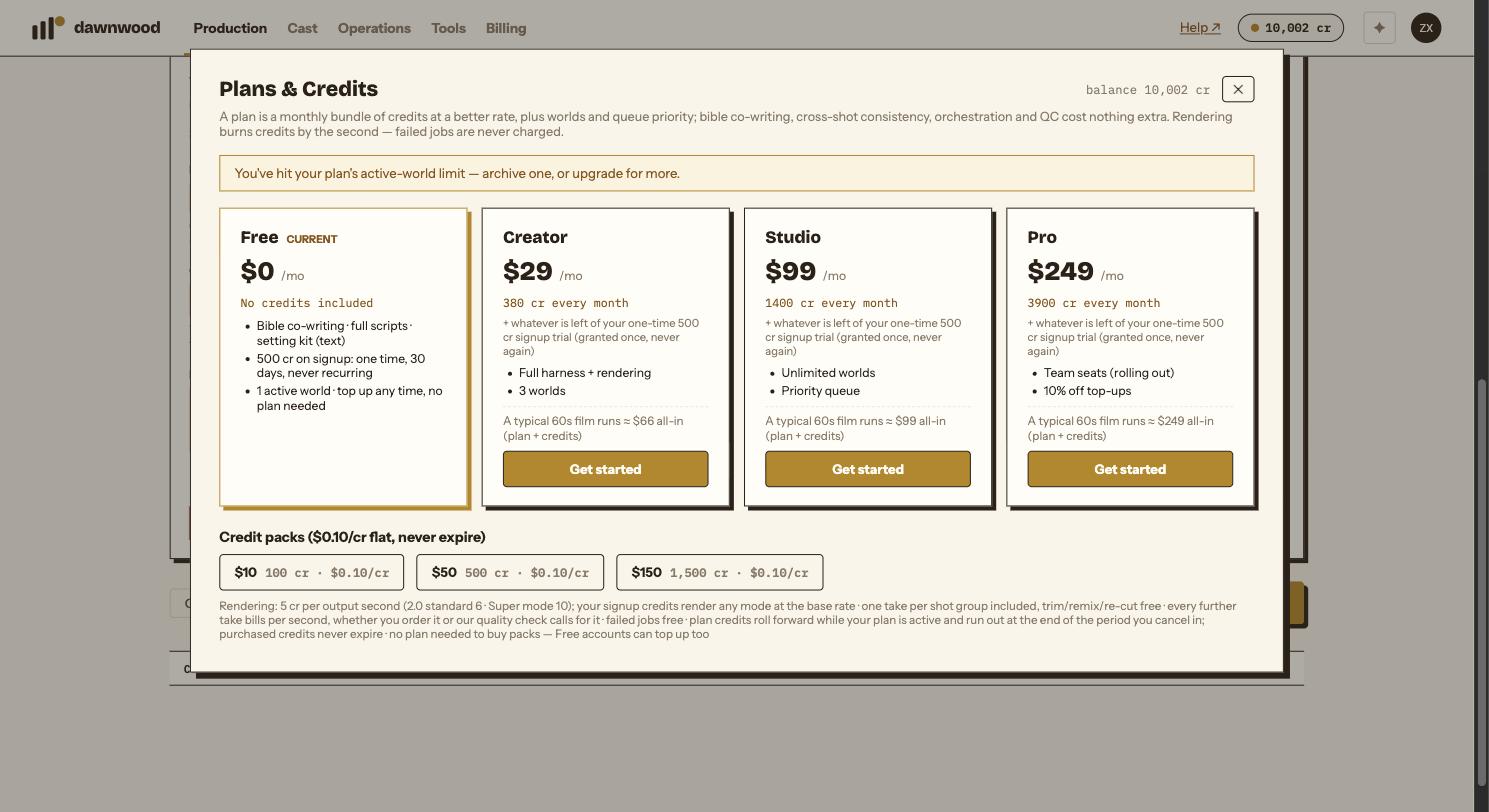
The signup pool renders any available engine at the base rate of 5 cr/s, including Super. When that pool runs out, the selected engine's regular rate applies. Check the estimate before confirming.
Why am I asked for a card before my first render?
Before your first video render we ask for a $0 card check through Stripe. Nothing is charged; it unlocks rendering with your free credits. Bible, scripts, art and the free tools never need a card. The signup credits are one per card: if the same card is already on another account, they can't be used for renders there, though purchased credits work as usual.
Three credit pools
- Signup: 500 credits, valid for 30 days.
- Subscription: credits arrive every billing period and roll forward while the plan is active. An unused month is not a lost month. If you cancel, the credits you still hold run out at the end of the period you cancelled in.
- Purchased packs: one-time top-ups at a flat $0.10 per credit. They never expire, and no plan is needed to buy them.
Render rates
| Engine | Rate |
|---|---|
| Fast / H3 | 5 credits per second |
| 2.0 | 6 credits per second |
| 2.5 / Super | 10 credits per second outside the signup pool |
Art, voices and other paid tools have separate costs shown before you confirm. Each render group includes one take; asking for another take costs additional credits. A failed render is not charged, or its reserved credits are returned. A completed take that you want to change is a retake.
Plans and packs
Creator is $29/month with 380 credits; Studio is $99/month with 1,400; Pro is $249/month with 3,900. Packs are a flat $0.10 per credit ($10 / 100, $50 / 500, $150 / 1,500), so every plan puts credits in your account below the pack rate. That is what a plan buys you, along with worlds and queue priority. See current plans and pack prices. Applicable taxes are added at checkout.
When the balance runs out
Paid generation pauses until you have enough credits. Your existing work stays in your account. Open Billing to check usage and buy a pack or choose a plan. For an unexpected charge, email support@dawnwood.ai with the episode and operation.
Still stuck? Email support@dawnwood.ai with your account email, the series, the episode and the segment or group — see what to include.