Short answerOnce nothing in the check needs you, click Build package. Every episode is fixed the way our own series passed review (1-second cover opening, end card cut, edges lifted, and for series made here, subtitles re-burned narrower) and renamed Episode NN - Title, then zipped with a 3:4 series cover, a manifest and a field-by-field upload guide. Packaging after a light check costs 2 credits per episode; it is included in the full check; rebuilding is free and a failed package is refunded.
Build it
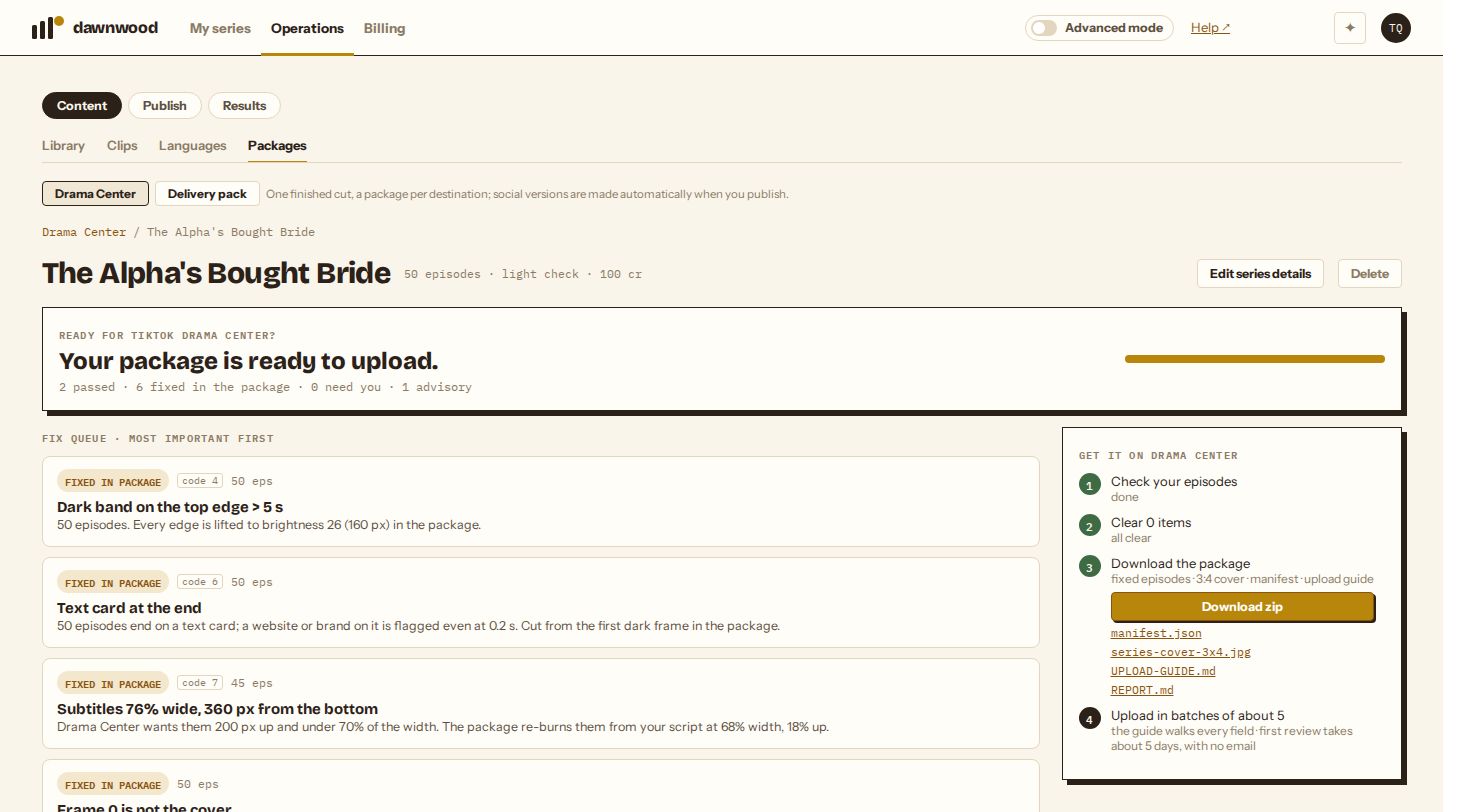
When the report says nothing needs you, step 3 on the right shows Build package, with its price if there is one. Packaging works four episodes at a time; each takes a few minutes, so a 50-episode season is ready in one to two hours. You can leave the page. The check then shows PACKAGED, and the report links the files.
What each episode gets
- A 1-second cover opening. Drama Center uses frame 0 as the episode cover, so the episode cover (or your poster) is shown for the first second. Skipped if the episode already opens on a cover.
- The end card cut. If an episode ends on a text card, it is cut at the first dark frame before the card, with a short audio fade, so no website or logo stays in frame (code 6).
- Lifted edges. All four edges are brightened just enough, over a 160-pixel band, that no edge stays darker than the review threshold (code 4). Brighter pixels are left alone, so the picture looks the same.
- Narrower subtitles, for series made in Dawnwood. If the subtitles are too wide or too low (code 7), the episode is rebuilt from its clean cut with the subtitles re-burned at under 70% of the width, 18% above the bottom. Episodes whose cut no longer matches the script timeline (re-edited versions) keep their subtitles, and the report says so. Uploaded episodes keep theirs; re-burn them before uploading if the check flags them.
- One format. 1080×1920, 30 fps, H.264 MP4 with AAC stereo audio.
- A name Drama Center turns into the episode title:
Episode 01 - The Alpha's Bought Bride.mp4.
What is in the zip
| File | What it is |
|---|---|
episodes/Episode NN - Title.mp4 | Every episode, fixed and renamed |
series-cover-3x4.jpg | 900×1200 series cover, cut from your 9:16 poster |
manifest.json | Title, description, language, total and free episodes, genres, audience, AI declaration, creation type, music source, the episode list |
UPLOAD-GUIDE.md | Every field of the Drama Center form in order, with what to enter |
REPORT.md | The check's findings, for your records |
Seasons over 3 GB are not zipped; download the episodes one by one from the report instead. Links stay valid for 24 hours; come back to the report for fresh ones.
Price
| You ran | Building the package |
|---|---|
| Light check (free) | 2 credits per episode, charged when you click Build package |
| Full check (2 credits per episode) | Included |
Changing the series details after packaging sends the check back to ready; Build package again re-packs it for free. A package that fails is refunded.
Uploading to Drama Center
The guide in the zip walks through each field. In short:
- On drama.tiktok.com go to Series → Create series.
- Enter the title, description, language and total episode count. The total must equal the number of files and can't be changed after you submit.
- Set the free episodes (fewer than the total), up to three genres and the audience.
- Answer AI short drama: Yes and pick the creation type. Drama Center flips it to Yes on its own if it detects AI.
- Upload
series-cover-3x4.jpg. - Upload the episodes in batches of about five. Wait until every episode in a batch reaches Draft before starting the next.
- Add copyright material: one core document, or two supporting ones such as screenshots of the AI process or the edit timeline (PDF, JPG or PNG, 10 MB each). Don't upload more than you need.
- Tick the self-check boxes and Submit.
After you submit
- There is no email. Log in to check. Our first review took about five days; replacements took 10 to 20 minutes.
- Episodes are locked while under review. After the series is posted, the only way to change an episode is Replace, and submitting replaces sends the whole series back into review. Finish all your replacements first, then submit once.
- "Optimizable" comes with a code: 4 is dark edges, 6 is a watermark or website, 7 is the subtitle area. The series still distributes, but fix it with a replacement when you can.
- If more than 10% of episodes are restricted, the whole series stays off. One flagged frame can cost a season, which is why the full check looks at the picture of every episode.
Still stuck? Email support@dawnwood.ai with your account email, the series, the episode and the segment or group — see what to include.