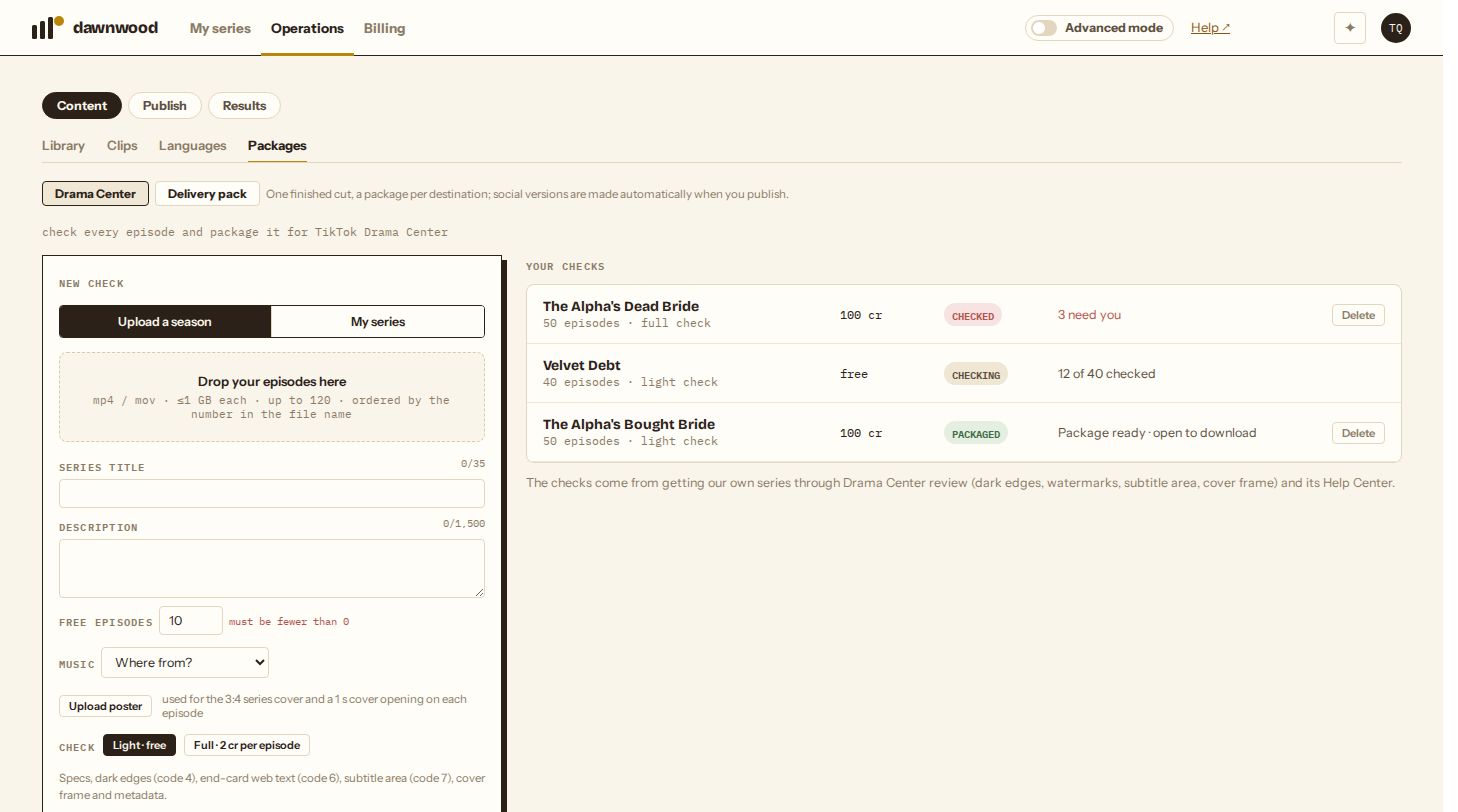
Short answerOpen Operations › Content › Packages › Drama Center, upload the season's episodes or pick one of your series, fill in the title, description, free episodes and music source, and click Check episodes. The light check is free and looks at specs, dark edges (rejection code 4), text on end cards (code 6), the subtitle area (code 7), the cover frame and the metadata limits. The full check adds picture safety and story risks for 2 credits per episode. The report sorts every finding into needs you, fixed in the package, advisory or passed.

Why check first
TikTok Drama Center does not email review results, locks episodes while they are under review, and re-reviews the whole series when you replace one episode. A rejection only tells you a number. Getting our own series through took several rounds; the check turns what we learned into a list you can clear before the first upload.
Start a check
- Open Operations › Content › Packages and choose Drama Center.
- Pick the source. Upload a season takes MP4 or MOV files, up to 1 GB each and 120 episodes, ordered by the number in the file name (
EP03,Episode 3,03.mp4). My series takes every finished episode of a series you made here; bonus episodes numbered 901 and up are left out. - Fill in Series title (35 characters at most), Description (1,500 at most), Free episodes (must be fewer than the total) and Music (where the background music came from).
- Optionally Upload poster: a 9:16 or 3:4 image used for the 3:4 series cover and a 1-second cover opening on each episode. Series made here use their own covers.
- Choose Light · free or Full · 2 cr per episode and click Check episodes.
A light check takes about 15 to 20 seconds per episode. You can leave; the report fills in as episodes finish.
What the light check looks at
| Check | Drama Center's rule | What we measure |
|---|---|---|
| Specs | MP4, 5 MB–4 GB, 15 s–20 min, 9:16, 720p or better | Every file's container, size, length and resolution; episodes under a minute get an advisory (allowed, but the AI-drama incentive needs over a minute) |
| Dark edges, code 4 | No dark band more than 20 px wide along an edge for over 5 s | Brightness of each edge strip over time |
| End-card text, code 6 | No website, logo or brand in frame, even for 0.2 s | A dark end card with text in the last seconds |
| Subtitle area, code 7 | Subtitles at least 200 px above the bottom and no wider than 70% of the frame | The burned-in subtitle box across the episode |
| Cover frame | The default episode cover is frame 0 | Whether the first second is a cover |
| Metadata | Title ≤ 35, description ≤ 1,500, free episodes < total, ≤ 120 episodes, ≤ 3 genres | What you entered |
| Music | Music outside TikTok's library is rejected | Your answer to the music question |
What the full check adds
- Picture safety on 13 frames per episode, including three from the last four seconds: anything that reads as self-harm (a wrist wound next to broken glass was enough to restrict one of our episodes), sexualised content, a character who reads as a minor, lingering cruelty, a web address or logo.
- Story risks in the dialogue or script: marriage forced for money, romanticised confinement or stalking, incest including step-siblings, alpha/omega hierarchy mating, suicide used as a twist, gratuitous profanity, detailed sexual language. Drama Center's guidelines restrict these. They are advisories, not blockers: keep the framing non-romanticised.
The full check is charged when it starts (2 credits per episode) and includes the package. If it fails before checking any episode, it is refunded.
Reading the report
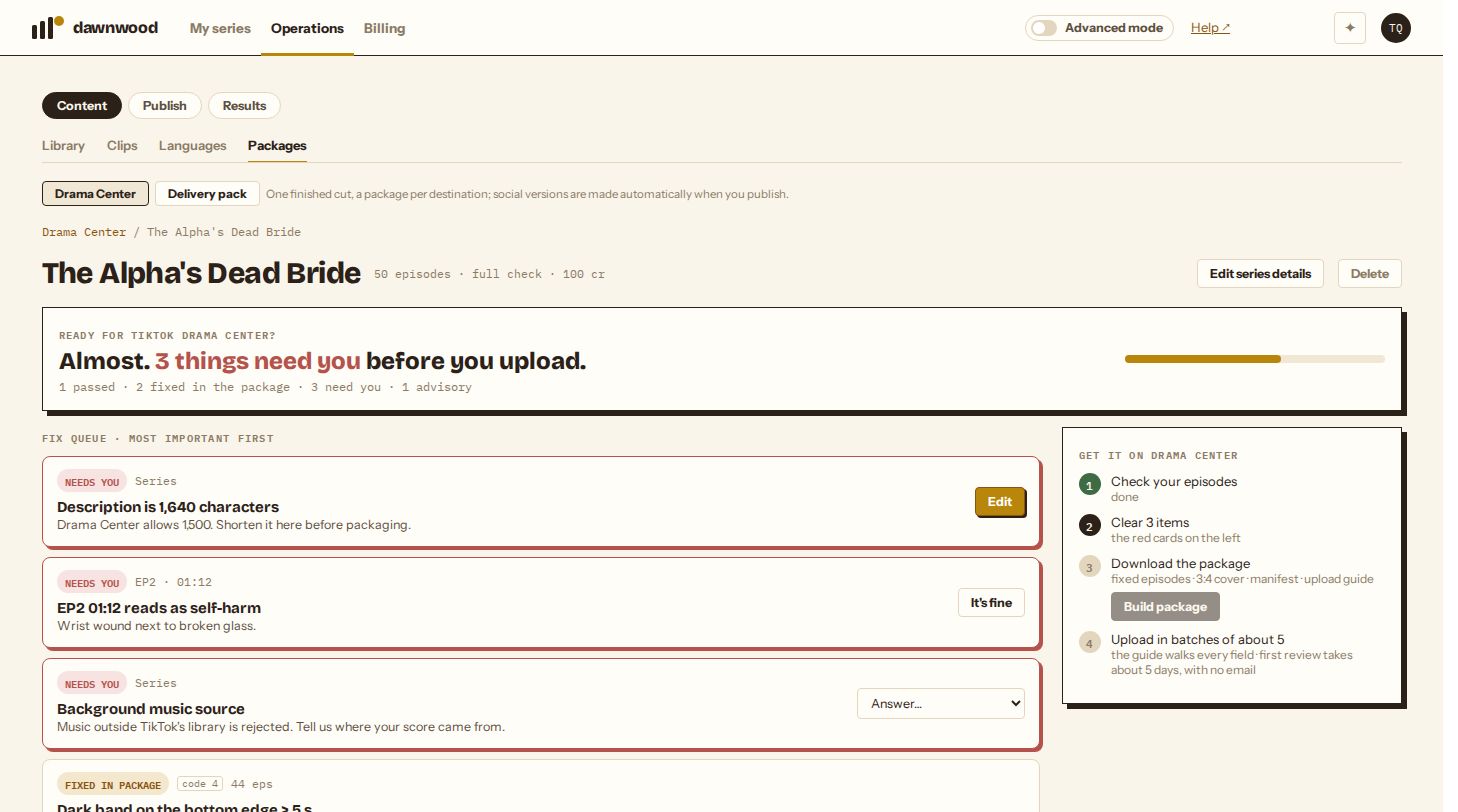
The headline says whether the season is ready. Below it, the fix queue lists findings most important first:
- Needs you (red): only you can resolve these. Edit the series details, answer the music question, upload a poster, or for a picture finding look at the moment and click It's fine if it is not what it looks like. Packaging is locked until none are left.
- Fixed in package: you don't need to do anything; the package fixes it. See what the package does.
- Advisory: worth knowing, not blocking.
- Passed: hidden behind show all.
Rejection codes are shown on the cards (code 4, code 6, code 7) so they match what Drama Center shows you later.
Series you made here
When every episode of a series is signed off, a free light check runs on its own. The Drama Center · readiness card on the series' Episodes page shows the result and links to the report. It runs again only when an episode's cut changes.
Changing details and deleting a check
Edit series details on the report changes the title, description, free episodes or music answer and re-scores the report at once; nothing is re-checked. Delete removes a check and anything it packaged; it is not available while the check is running. Your uploaded videos and your series are never touched, and credits for a finished full check are not refunded.
From an agent
Over MCP, dramacenter_check starts a check, dramacenter_get returns the report, dramacenter_update edits details or marks a finding as fine, and dramacenter_delete removes it. See what your agent can do over MCP.
Still stuck? Email support@dawnwood.ai with your account email, the series, the episode and the segment or group — see what to include.