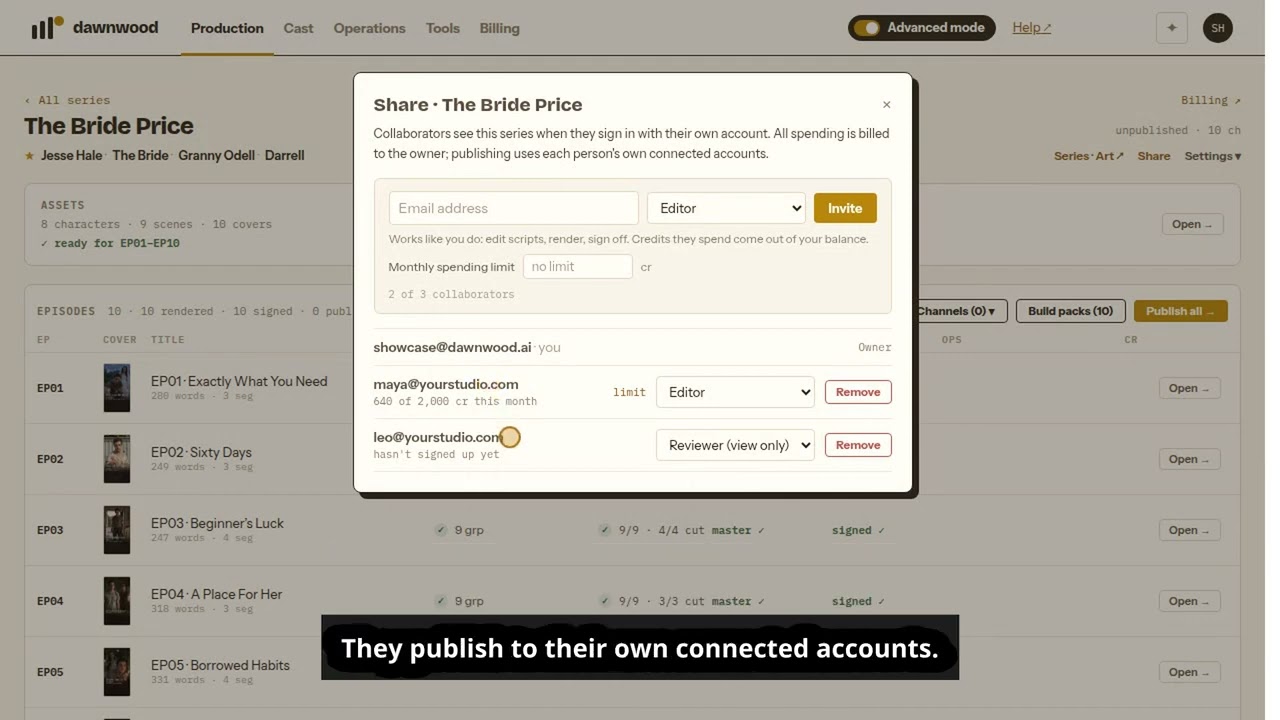
Short answerOpen the series and click Share next to Series · Art. Enter their email and pick a role. Editors work on the series the way you do, and the credits they spend come out of your balance; you can set each editor a monthly limit. Reviewers can see everything but can't change anything or spend credits. Free includes 1 collaborator per series, Creator 3, Studio 10 and Pro unlimited.
Inviting someone
Open the series and click Share, next to Series · Art in the page header. Enter the person's email address, choose Editor or Reviewer, and click Invite.
They get an email from Dawnwood with a link. If they already have an account, the series appears in their Your series with a Shared tag. If they don't, they create an account with that same email address. Access is tied to the address, so the series is waiting when they sign in, and there is nothing to accept.
What each role can do
| Owner | Editor | Reviewer | |
|---|---|---|---|
| See the bible, scripts, storyboards, cuts and art | yes | yes | yes |
| Edit scripts and storyboards, render, retake, sign off | yes | yes | no |
| Spend credits | yes, from their own balance | yes, from the owner's balance | no |
| Publish episodes | yes, to their own connected accounts | yes, to their own connected accounts | no |
| Invite, change roles, set limits, remove people | yes | no | no |
| Delete the series | yes | no | no |
A reviewer who tries to change something gets a "view-only access" message, and nothing is saved or charged. Agents and the API follow the same rules: an agent acting as a reviewer can read the series, but it can't make changes.
Who pays
Every credit spent on a shared series is billed to the owner, whoever clicked the button. The owner's usage page shows these charges with everything else. The Share panel shows how much each editor has spent this month.
To cap that spending, click limit next to an editor in the Share panel and enter a monthly number of credits. Leave it empty for no limit. If an action would take the editor past their limit, it stops with a message asking them to contact the owner. Work that is already running finishes normally.
How many people can I add?
The limit is per series and follows the owner's plan. Editors and reviewers count the same.
| Plan | Collaborators per series |
|---|---|
| Free | 1 |
| Creator | 3 |
| Studio | 10 |
| Pro | Unlimited |
Changing roles, removing people, leaving
As the owner, open Share and change someone's role from the dropdown, or click Remove. The change takes effect on their next click. A collaborator can leave a series from the same panel by clicking Leave.
Still stuck? Email support@dawnwood.ai with your account email, the series, the episode and the segment or group — see what to include.